Duplicate cards on an iPhone usually come from a phone switch, a second account, or a file imported twice. Apple’s Contacts app can merge cards that share the same first and last name. Copies that differ by a middle name, a company, or a typo are left alone.
Compact Contacts Manager looks for duplicates by email address, phone number, or name and company, lets you choose what survives, and keeps a private recovery point so a merge can be undone later. If Apple’s View Duplicates option never appears for you, start with the guide on why it is missing.
Before you merge
- Export a copy of your contacts first. A merge reaches your other devices after the account syncs.
- Check which account holds each card. Cards in read-only accounts, such as some Exchange directories, cannot be merged away.
- Try the flow on Sample Contacts if you want to see it without touching real cards: Clean Up › View Sample Contacts….
Find the duplicates
You can also start from the contact list: tap Select Contacts, choose two or more cards, and tap Merge Studio in the bar at the bottom.
- Open the Clean Up tab. Tap Find Potential Duplicates…. The scan only reads your contacts.
- Read each group’s reason. A group says Same email, Same phone, or Same name and company. Email and phone matches are marked Strong match; a name-and-company match is marked Review.
- Decide whether it is really one person. Two colleagues can share an office number. A match is a suggestion, not proof.
Merge in four steps
Tap Merge Contacts. The app creates a private recovery point, rechecks every source card, verifies the merged card, and only then removes the originals. If a card changed after the preview, the latest values are loaded and you review again.
| Step | What you decide |
|---|---|
| Cards | Check the cards in the group and the account each one belongs to. Read-only cards show a lock. |
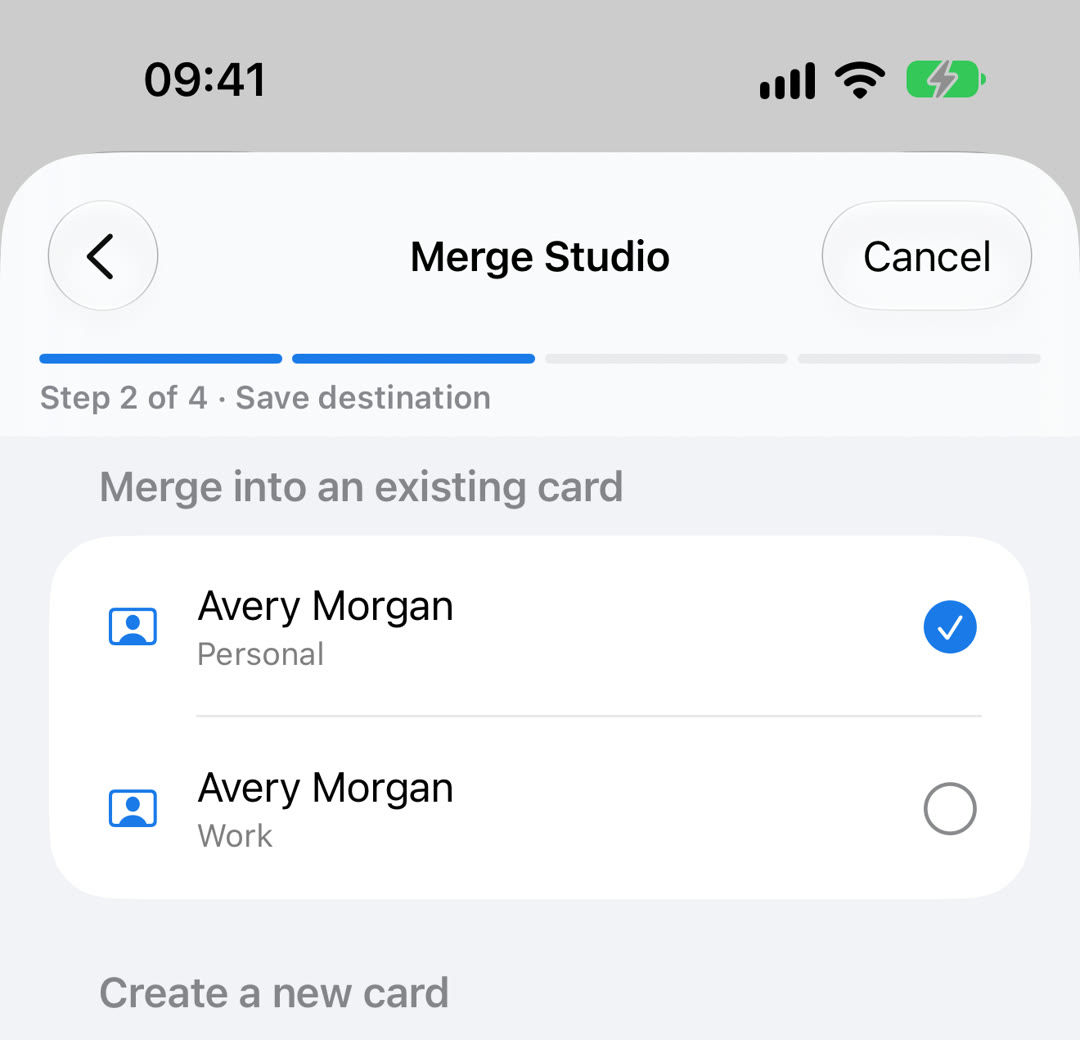
| Save destination | Merge into an existing card, or create a new card in a writable account. The first writable card is chosen by default. |
| Field sources | Fields that differ come first. Pick which card supplies each value, or choose Combine unique values for email addresses, phone numbers, addresses, URLs, dates, and relationships. Identical fields are folded away. |
| Preview | Read the merged card, the destination account, and either Ready to merge or the reason the merge is blocked. |
When a merge is blocked
- A card is read-only or linked to a card in another account. The originals could not be removed, so the app does not start.
- A source card has a photo that cannot be copied safely. Keep the card that owns the photo as the destination, or remove the photo first.
- Notes cannot be read and restored safely in this account.
- The chosen groups belong to a different account than the destination.
- Private recovery storage is unavailable. Unlock the iPhone and try again.
Undo a merge later
- Open Merge History. Go to Clean Up › Merge History. Each merge lists the names, the date and time, and the number of records.
- Tap Undo. Confirm, and the original cards are restored from the recovery point. The recovery point stays on the iPhone for 30 days; no file has to be picked.
Important: If you edited the merged card after merging, Undo stops to protect those newer changes. Merges made in Apple Contacts or another app are not in Merge History.
After the cleanup
Open a few merged cards and check their phone numbers, email addresses, and account. Give iCloud, Google, or Exchange time to sync, then check another device. If duplicates come back, look for the source: an account added twice or a second device pushing an old copy.
Questions people ask
Is there a Merge All button?
No. Each group is reviewed and merged on its own, so nothing is combined that you have not looked at.
Can I undo a merge on iPhone?
Yes, for merges made in Compact Contacts Manager. Open Clean Up › Merge History and tap Undo within 30 days, as long as the merged card has not been edited since.
Does merging work across iCloud and Google?
The merged card is saved in one account you choose. The app verifies the save, but provider syncing is not atomic across accounts, so check both accounts afterwards.
Are Notes kept?
Notes is one of the fields you choose a source for. If the account does not allow Notes to be read and restored safely, the merge is blocked instead of losing them.
Does the same work on iPad?
Yes. Compact Contacts Manager is one app for iPhone and iPad, and Merge History works the same way on both.