
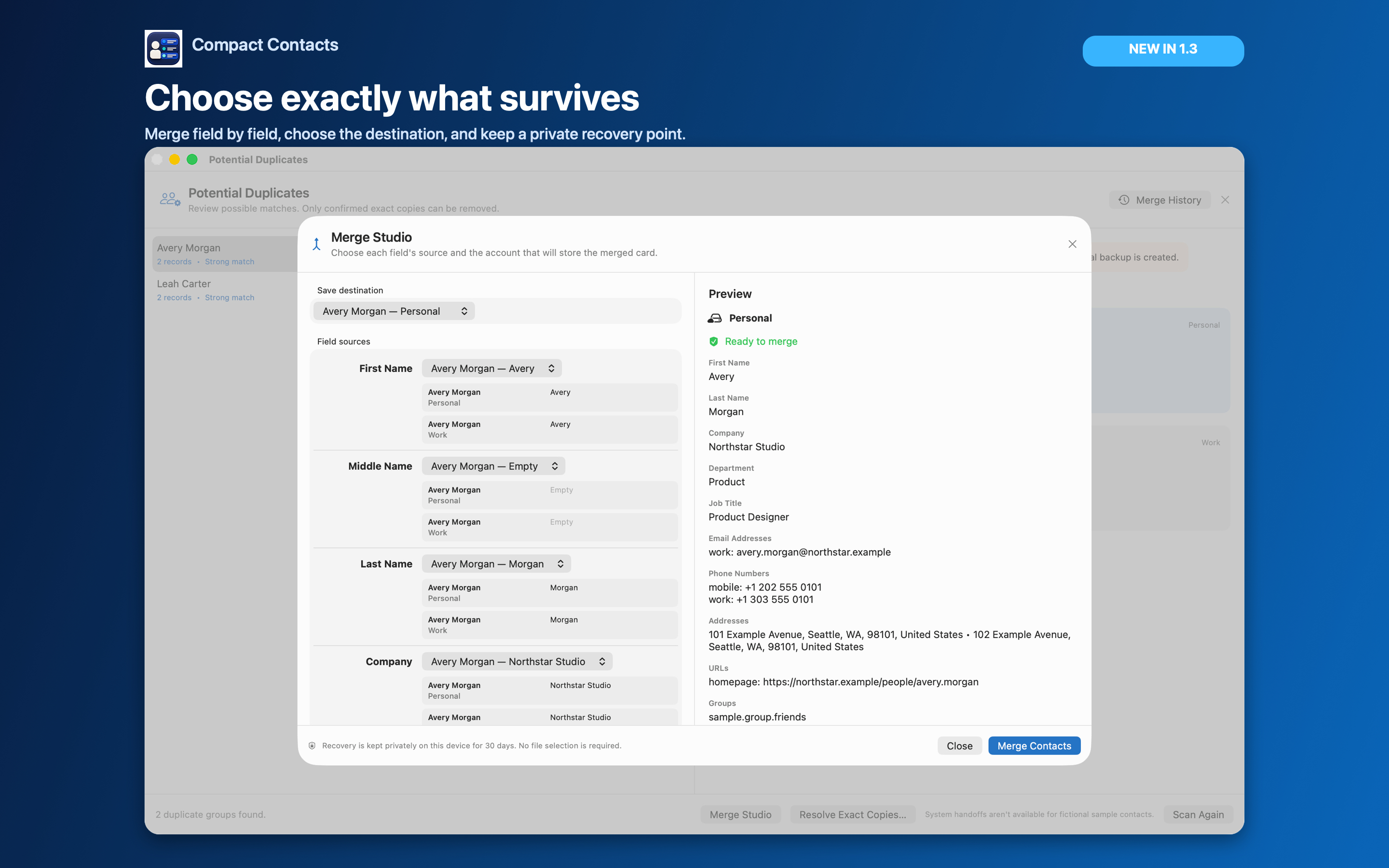
Choose the built-in Apple Contacts method when combining duplicate cards in one account is enough. Choose Compact Contacts when you need to inspect which source supplies each field before confirming a merge. Back up important contacts before either workflow.
Linking cards from separate accounts is different from merging them. Linked cards remain in their original accounts. Seeing one combined card in Apple Contacts does not mean the underlying source records were deleted.
Merge two cards using Apple Contacts
- Select the matching cards. In Apple Contacts on Mac, select the cards for the same person. Compare the name, numbers, Notes, and account first.
- Use the Card menu. Choose Merge Selected Cards to combine the selected duplicates. Apple also provides Look for Duplicates in this menu for finding and merging duplicate cards.
- Reopen the result. Check the fields you needed to keep. When the records belong to different accounts, review Apple's linking instructions before deciding to consolidate anything.
Compare a duplicate group in Compact Contacts 1.4.1
- Back up before a cleanup session. Create a full Contacts archive when you plan to review many duplicate groups.
- Choose Find Potential Duplicates. Open the More menu in the main toolbar and choose Find Potential Duplicates. Review a group from the on-demand scan; a strong match is still a reason to inspect the cards, not proof that two people are identical.
- Open Merge Studio. The initial preview loads automatically. No file picker is part of the merge action.
Choose what survives
For single-value fields such as first name, company, department, and job title, choose the source card whose value should survive. For supported multi-value fields such as phone numbers, email addresses, URLs, relationships, and addresses, keep the useful labeled values rather than forcing one entire card to win.
Choose an existing writable card or a writable destination account. Review the destination and the complete preview after every choice; the preview refreshes automatically.
Merge, verify, and undo when necessary
- Merge Contacts. Compact Contacts creates an encrypted, app-managed recovery point on this Mac before the first Contacts write, then performs the selected merge.
- Verify the result. Open the merged card, check its account and fields, and let the configured provider finish synchronizing before beginning another related cleanup.
- Use Merge History. Eligible recovery points remain available for 30 days. Undo restores the source cards and removes the merged result only after safety checks.
Important: Undo refuses to overwrite a card changed after the merge. A provider may normalize restored fields or assign new record identifiers, so encrypted history is a bounded recovery path, not a promise of lossless provider-wide rollback.
What Merge Studio does not automate
There is no Merge All action and no background deletion. Cross-provider consolidation is not presented as an atomic server-side move, because iCloud, Google, Exchange, and CardDAV remain responsible for their own synchronization and permissions.
Since version 1.4, iPad supports Merge Studio with real contacts, field selection, a preview, and encrypted recovery. The earlier iPad 1.3 release limited this flow to Sample Contacts.
Check Notes and numbers before confirming
For example, one Avery Morgan card might have a project note while the other has a second phone number. Review both values and the preview before choosing Merge Contacts. Do not assume the most recently opened card contains everything.
If the apparent duplicate is actually a second person or an intentional record in a separate account, leave the cards unchanged. If a number merely has different punctuation, review formatting separately rather than deleting a card to make the list look tidy.
Questions people ask
Can Compact Contacts undo a merge made in Apple Contacts?
No. Compact Contacts Merge History applies to eligible merges performed by Compact Contacts. It does not retroactively create recovery for another app's edits.
Does linking remove the source cards?
No. Linking presents information from separate account cards together while retaining those source cards. It is different from consolidating them into a merged record.
How long is Compact Contacts merge recovery available?
Eligible recovery points are kept for 30 days. Undo stops if later edits would be overwritten; provider normalization can still affect restored records.
Can I merge all duplicates automatically?
Compact Contacts requires review and confirmation of one group at a time. There is no Merge All action.