
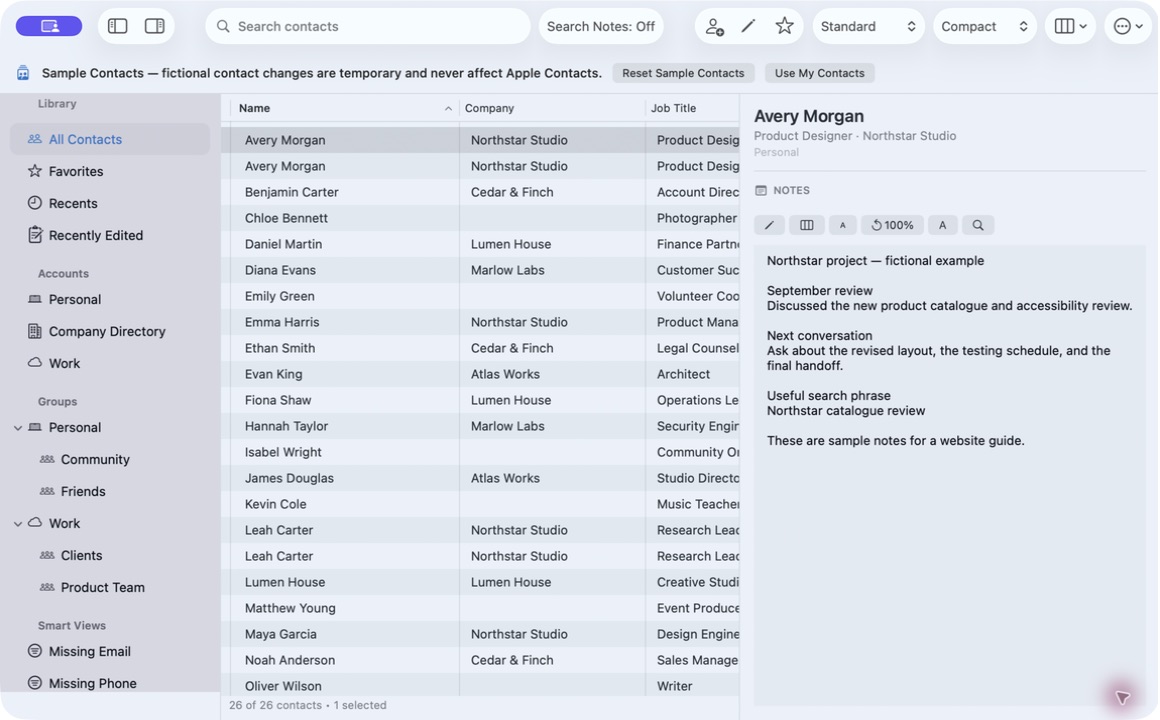
A contact detail panel usually shows every section at once: phones, emails, addresses, dates, relationships, social profiles, and Notes. That is fine for a short card. When the Notes field holds a project history or meeting log, the other sections push it below the fold.
Compact Contacts lets you decide which sections the Inspector shows and how much width it gets. Nothing about the contact changes; only the reading space does.
Choose which sections appear
- Open Settings. Go to Appearance and find Detail Sections. The description reads “Choose which sections appear in the contact detail panel.”
- Turn off what you do not read. Social Profiles, Relationships, and Dates are common candidates. Keep Phone Numbers and Email Addresses if you contact people from this panel.
- Keep Notes on. The Notes section needs Contacts permission and a build with Apple’s managed Notes capability. If it is missing, check the permission guide before changing layout.
Give the Inspector more width
Drag the divider between the table and the Inspector to give Notes more width (on iPad, use the Inspector Width setting). On a smaller display, hide the sidebar with Control-Command-S while you read, and bring it back when you need Smart Views or groups.
Option-Command-I shows or hides the Inspector entirely, which is useful when you return to comparing many rows.
Use the Notes-focused layout for long text
Settings › Appearance includes Notes-Focused Layout. With it on, Notes becomes the dominant part of the detail panel instead of one section among many.
Use the Notes font controls to increase or decrease the text size. Since version 1.4.1 on Mac and 1.5 on iPad, a reset returns Notes text to exactly 100%.
Important: Hidden sections are hidden only from the panel. The phone numbers, addresses, and other fields remain on the contact and in search.
When to switch back
- Turn a section back on before editing that field, so you can see the current value.
- Use a wider layout for reading and a normal layout for comparing cards.
- If a note is read-only, the account owns that restriction; layout settings cannot change it.
Questions people ask
Does hiding a section delete that information?
No. Detail Sections controls what the panel displays. The fields stay on the contact and remain searchable.
Why is there no Notes section at all?
Notes requires Contacts permission and Apple’s managed Notes capability in the installed build. Some accounts also restrict the field.
Is the layout the same on iPad?
iPad has its own adaptive layout. The Notes text-size controls and 100% reset are available on iPad in version 1.5.